
Tailscale + Cloudflare Tunnel 内网穿透部署方案
方案概述
这个方案通过组合使用Tailscale(P2P VPN)和Cloudflare Tunnel(云端隧道)来实现安全可靠的内网穿透。主要优势包括:
- 保护本地设备和VPS的IP不被直接暴露
- 提供比直连Cloudflare更稳定的连接
- 维持较好的访问速度
- 可以实现一机多用(VPS还可用于其他用途)
方案思路图:
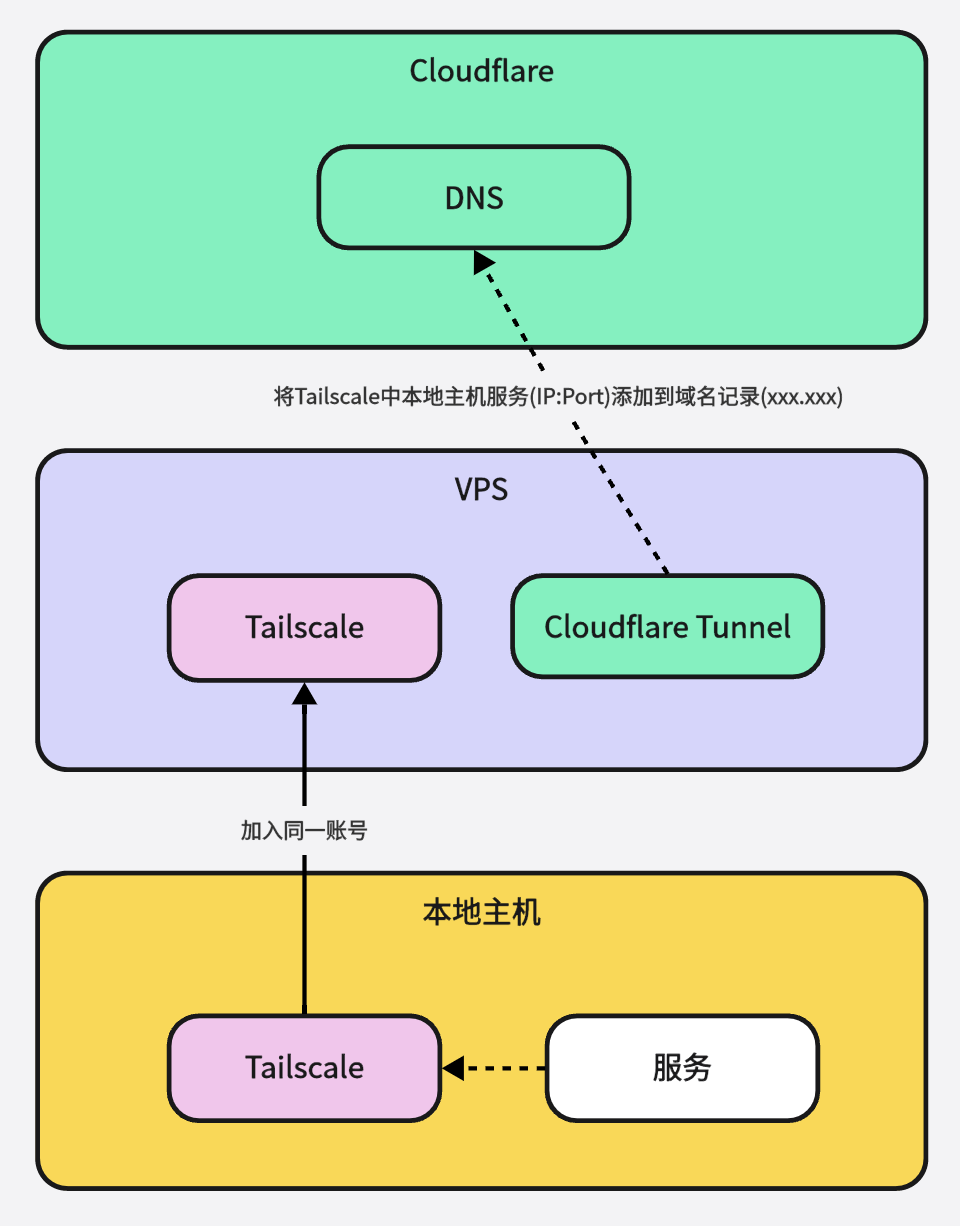
前置准备
- 一个域名(需要托管在Cloudflare上%% %%)
- 一台海外VPS
- 本地需要暴露的服务器/设备
- Cloudflare账号
- Tailscale账号
详细部署步骤
步骤1:部署Tailscale
-
本地设备安装:
- 访问 https://tailscale.com/download 下载对应系统的客户端
- 运行安装程序
- 使用Tailscale账号登录
- 记录下本地设备的Tailscale IP(通常格式为100.xx.xx.xx)
-
VPS安装:
1
2
3
4
# 对于Ubuntu/Debian系统 curl -fsSL https://tailscale.com/install.sh | sh # 登录Tailscale tailscale up
原理说明:Tailscale使用Wireguard协议建立P2P连接,允许设备之间直接通信,避免了传统VPN的中心化瓶颈。
步骤2:部署Cloudflare Tunnel
-
安装cloudflared(以Linux为例):
1
2
3
# 下载并安装cloudflared wget -q https://github.com/cloudflare/cloudflared/releases/latest/download/cloudflared-linux-amd64.deb dpkg -i cloudflared-linux-amd64.deb -
登录Cloudflare:
1cloudflared tunnel login -
创建隧道:
1
2
3
4
# 创建隧道 cloudflared tunnel create my-tunnel # 获取隧道ID cloudflared tunnel list -
配置隧道:
首先,创建/编辑 Cloudflare Tunnel 的配置文件:
1
2
# 创建或编辑配置文件 nano /etc/cloudflared/config.yml添加配置内容如下:
1 2 3 4 5 6 7 8 9 10 11 12 13tunnel: <你的隧道ID> credentials-file: /root/.cloudflared/<隧道ID>.json # 隧道配置 ingress: - hostname: your-service.yourdomain.com service: http://<Tailscale_IP>:<PORT> originRequest: noTLSVerify: true http2Origin: true connectTimeout: 30s # 默认规则 - service: http_status:404 -
启动隧道:
1cloudflared tunnel run my-tunnel -
配置DNS记录,执行命令自动向配置的域中增加域名记录
1cloudflared tunnel route dns my-tunnel your-service.yourdomain.com
原理说明:Cloudflare Tunnel创建了一个安全的出站连接,避免了开放入站端口的需求,同时利用Cloudflare的全球网络提供DDoS防护和SSL加密。
步骤3:(可选)部署DERP中继节点
如果需要更好的连接稳定性,可以在国内服务器部署DERP节点:
-
下载derper:
1go install tailscale.com/cmd/derper@main -
运行DERP服务器:
1derper --hostname=derp.yourdomain.com --cert-mode=manual --certdir=/etc/derper/certs --stun=true -
在Tailscale管理界面配置自定义DERP节点
原理说明:DERP(Designated Encrypted Relay for Packets)服务器作为备用中继点,当设备间无法建立直接P2P连接时提供中转服务。
步骤4: 后台运行隧道
- 使用 systemd 服务方式(推荐):
|
|
- 使用 screen 命令:
|
|
- 使用 nohup 命令:
|
|
推荐使用第一种 systemd 服务的方式,优点是:
- 开机自动启动
- 自动重启(如果程序崩溃)
- 方便查看日志(使用
journalctl -u cloudflared) - 更易于管理(使用标准的 systemctl 命令)
安全性考虑
- Tailscale提供端到端加密
- Cloudflare Tunnel确保所有流量经过加密通道
- 不需要在本地设备或VPS上开放入站端口
- 可以使用Cloudflare的访问策略进行额外的访问控制
故障排查
- 检查Tailscale连接状态:
tailscale status - 检查Cloudflare Tunnel状态:
cloudflared tunnel info <tunnel-id> - 查看Tunnel日志:
cloudflared tunnel run --loglevel debug <tunnel-id>